The Best IPTV Player for Mac in 2026 (Honest Comparison)

Android TV owners have a dozen great IPTV apps. Mac owners have… fewer. Search “IPTV player for Mac” and you’ll find old apps, emulators and a lot of pages trying to sell you a TV subscription.
So here’s a plain look at what actually works on a Mac in 2026.
Full disclosure: I’m Jerry, and I make ChannelBox. I’ve tried to be fair to the other players, and I’ll tell you when one of them is the better pick.
What to look for in a Mac IPTV player
- Xtream Codes and M3U support, so it works with whatever your provider gave you.
- A TV guide (EPG) that fills itself in, so you can see what’s on.
- A decent buffer, so short provider hiccups don’t freeze the picture.
- Dolby sound that works. Many channels use AC-3 or E-AC-3 sound that some Mac players play silently.
- Native Apple-chip support, so it runs cool and quiet on an M-series Mac.
1. VLC: free and plays anything
VLC opens M3U playlists and plays almost every stream, Dolby sound included. There’s no TV guide, no Xtream Codes login and no channel numbers. Best for: watching one or two channels for free. (See VLC for IPTV for setup and a buffering tip.)
2. IINA: the prettiest Mac media player
IINA is a lovely, free, Mac-only player. Like VLC it’s a media player first, so you get a playlist but no TV guide. Best for: Mac fans who want a beautiful player for occasional live streams.
3. IPTV Smarters: the one your provider mentions
Free, familiar and supported by most providers, with live TV, movies and series. Live channels are mostly browsed as lists rather than a guide grid. Best for: people who already know it from their phone or TV box. (Compared in IPTV Smarters alternatives.)
4. TiviMate in an Android emulator
TiviMate is the favourite on Android TV, but there’s no Mac version, and Android emulators on Apple-chip Macs are limited. Best for: honestly, I wouldn’t on a Mac. More in TiviMate for PC or Mac.
5. ChannelBox: cable-style live TV, made for computers
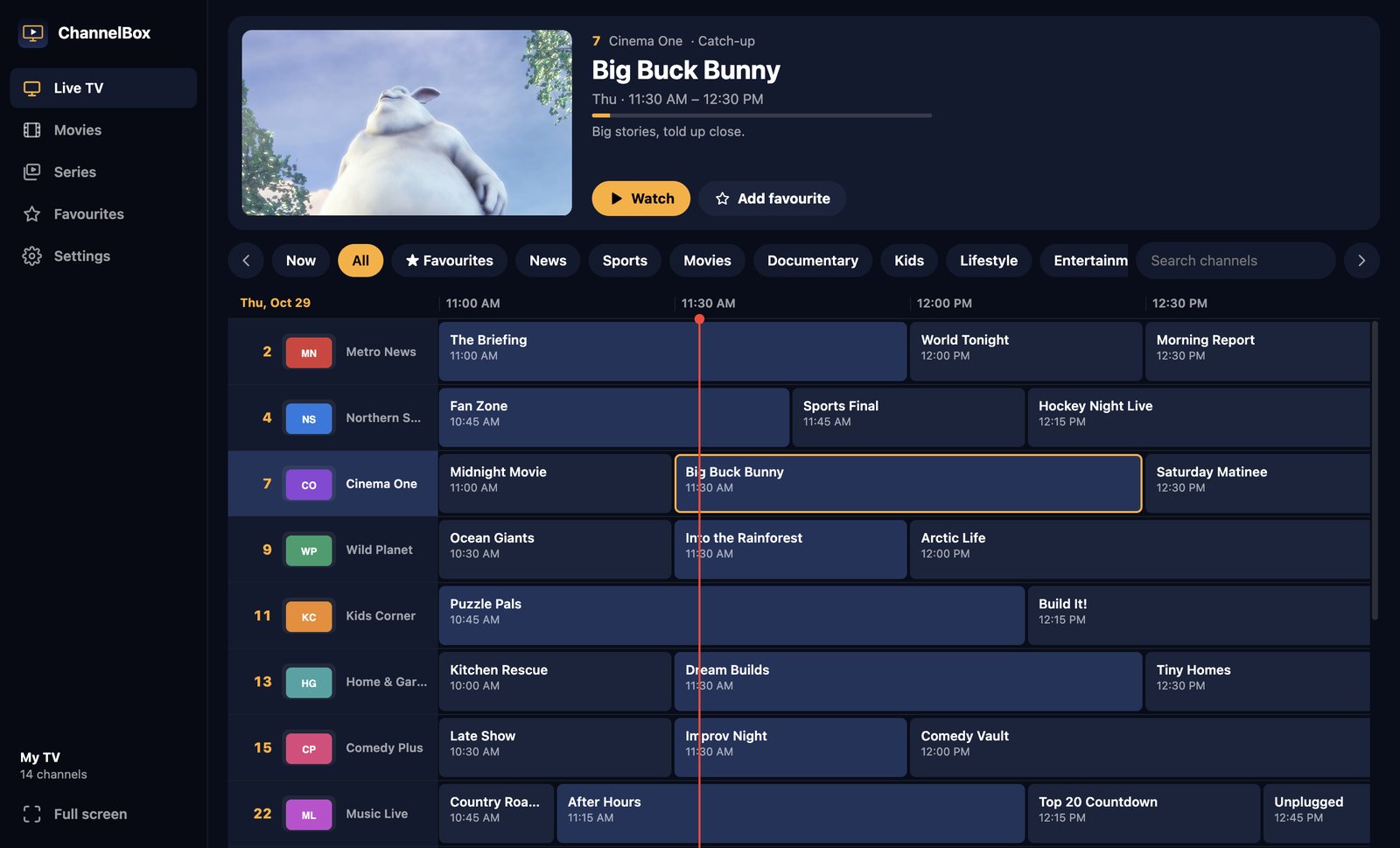
This is the one I make, so weigh my opinion accordingly. ChannelBox is built around a real cable-style guide: channel numbers and logos down the side, times across the top, and a live picture of the selected channel.

- Xtream Codes, M3U, M3U8 and XSPF playlists.
- The TV guide is pulled in automatically and refreshes every 12 hours.
- A 15-second cushion and automatic re-tuning against freezes.
- Dolby channels are converted on your Mac so they never play silent.
- Native on Apple-chip and Intel Macs, macOS 12 or newer.
- Picture in picture, full screen, and number keys that work like a remote.

Best for: people who want to sit down and watch live TV like cable on their Mac. $36 USD once, and the same purchase includes the Windows version.
Mac IPTV players compared
| Player | Price | TV guide grid | Xtream Codes | Anti-freeze |
|---|---|---|---|---|
| VLC | Free | No | No | Adjustable |
| IINA | Free | No | No | Basic |
| IPTV Smarters | Free | Mostly lists | Yes | Standard |
| TiviMate (emulator) | Free, paid Premium | Yes | Yes | Adjustable |
| ChannelBox | $36 once | Yes, with live preview | Yes | 15-second cushion |
Try ChannelBox: a cable-style TV guide, a 15-second anti-freeze cushion and Dolby sound that works, for Windows and Mac. $36 USD once, no subscription →
Frequently asked questions
What is the best free IPTV player for Mac?
Does ChannelBox run on Apple silicon Macs?
Why does my Mac show a warning when I open ChannelBox?
Can I watch IPTV on a Mac without an app?
Need a website that actually brings in work?
I build fast, modern sites for trades and local businesses across Kitchener-Waterloo.
Get in touch